


SMART Estimator App
2.626.00 Reviews
App Specs
- Version
- 4.9
- Updated On
- License
- Free
- Downloads
- 10,000+
- Developer
- SMART Estimator Ltd
- Categories
- Auto & Vehicles
- Platform
- Android
Screenshots
 Analysis by AppCompare
In a household where one person handles autobody work and another helps with calls, paperwork, or scheduling, a specialist estimator can sound useful—but it is important to know whose work it is built around. I see SMART Estimator as a shop-focused tool, not a general home-renovation calculator. That distinction matters before anyone in a shared household downloads it expecting to price a kitchen refresh or keep a family project budget.
A shared device is not the same as a shared workflow
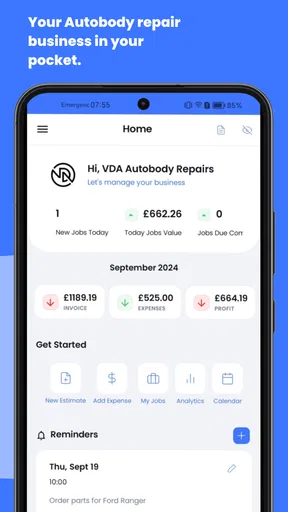
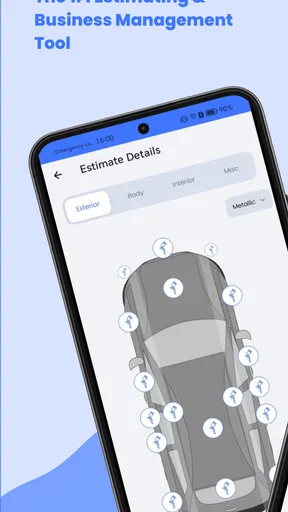
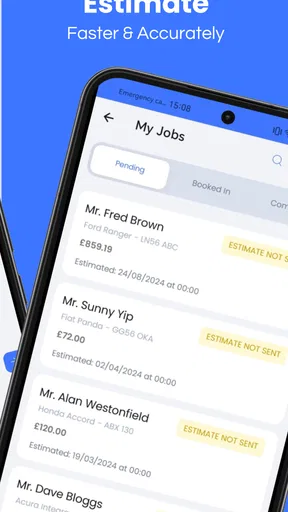
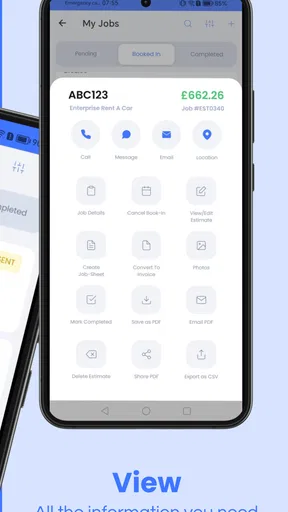
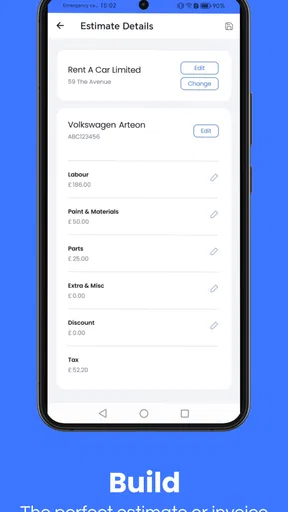
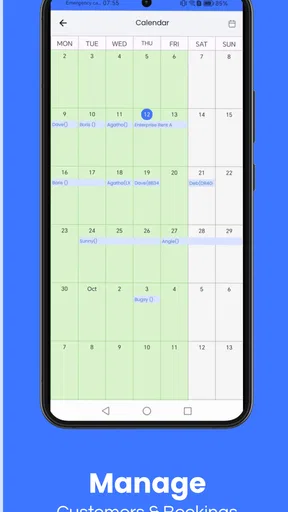
The app is made for autobody repair estimating, invoicing, and business management. That gives it a much narrower purpose than a household budget app, a general spreadsheet, or a broad project planner. If one person in the home runs an autobody business, the app may be relevant to their work; if everyone simply wants to compare the cost of weekend repairs, it is probably more specialized than necessary.
On a phone used by several people, I would keep the distinction between personal use and shop work clear. Estimates and invoices can contain business details, so a shared device should not be treated as a convenient family notebook. Before letting another person use the app, decide who is responsible for entering information and checking work. That simple boundary helps avoid confusing a business record with a household estimate.
Set expectations before entering a job
SMART Estimator is free to install, while in-app purchases range from $14.99 to $39.99 per item. I would look at the purchase choices before relying on a paid capability for a particular workflow. For a shop owner, the practical question is whether the features they need justify the cost; for a household member who only wants an occasional repair estimate, even a modest purchase may be hard to justify against a spreadsheet or a conversation with a repair shop.
I would also treat the first estimate as a test run rather than immediately making it the source of truth for a customer conversation. Check that the job details and figures are entered in the right places, then review the result before using it to explain a repair. This is especially useful if more than one person takes turns handling the phone: a quick handoff can be enough to lose context about what has already been entered.
Coordination that depends on clear ownership
In an autobody business, the person preparing an estimate may not be the same person who speaks with the customer or handles invoicing. A useful routine is to agree on who creates the estimate, who checks it, and who communicates the final version. The app’s business focus makes that kind of handoff more relevant than a household-style shared list, where everyone might freely edit the same plan.
For example, if a family member helps at the front desk while the owner is working on a vehicle, they should know whether they are collecting job information or making pricing decisions. Those are not automatically the same responsibility. I would use a separate written note for unanswered questions rather than guessing at an entry just to keep the process moving. That reduces the risk of turning a missing detail into an assumption in a customer-facing estimate.
Worth Reading Before You Choose

Flipboard Shows What News Apps Must Do Beyond the Feed

Switching to Android Auto Means Rethinking Your Driving Routine

Google Calendar Makes a Crowded Week Easier to Manage

Ludo King Makes the Most of the Minutes Between Plans

Baby Panda World Brings Quick Play to Modern Phones, but Its Game Library Feels Busy

ESPN’s Live Game View Makes Following Close Games Easier
Age context and trust
The app is rated for Everyone, but that does not make it a children’s tool or mean every household member should handle business records. Its purpose is professional autobody work, so I would judge access by responsibility and trust rather than the age label alone. A young person might be able to help with a simple administrative task under supervision, but pricing, invoices, and customer communication should stay with someone who understands the shop’s process.
Its developer is SMART Estimator Ltd. The app has an average rating of 2.5 from around 85 ratings, with 25 written reviews, and more than 10,000 installs. Those figures make me cautious about treating it as an automatic fit for every shop. I would try it against a real, low-risk workflow and decide from that experience whether it suits the people who need to use it.
Hey there! So, I recently got my hands on the SMART Estimator App and I’ve got to tell you, it’s a bit of a game-changer for anyone involved in construction or renovation projects. Let me walk you through my experience with it, and you can decide if it’s the tool you’ve been missing.
What’s the Buzz About?
Alright, first things first. You’re probably wondering what makes the SMART Estimator App stand out. In a nutshell, it’s designed to simplify the process of estimating project costs, whether you’re a seasoned pro or just getting started. With its user-friendly interface and robust features, it aims to cut down on the time and stress typically associated with estimating.
Getting Started
Installing the app was a breeze—just a quick download from the App Store or Google Play, and I was in. The setup was straightforward, guided by a series of prompts that made the whole process feel like a walk in the park. Within minutes, I was ready to dive into my first project estimate.
Features That Shine
One of the standout features is the ability to create detailed estimates with just a few taps. You can input material costs, labor rates, and even add in some contingency for those unexpected expenses. The app’s database is pretty extensive, with a wide range of materials and labor options to choose from.
What really blew me away was the integration capability. The app syncs seamlessly with other project management tools, making it super easy to keep everything in one place. Plus, it even supports cloud storage, so you can access your estimates from anywhere. Handy, right?
The User Experience
The developers have clearly put a lot of thought into the user experience. The interface is clean and intuitive, with everything neatly organized. Even if you’re not tech-savvy, you’ll find navigating the app to be a breeze. I also appreciated the little tips and suggestions that pop up as you’re working through an estimate—those were genuinely helpful!
I did notice a slight learning curve when it came to customizing certain aspects of the estimates, but after a few tries, it all made sense. The app’s help section is quite comprehensive, and there’s a support team ready to help if you get stuck.
Real-World Application
Now, let’s talk about how it holds up in the real world. I used the app to estimate costs for a small renovation project, and I have to say, it was spot on. The estimates were accurate, and the breakdown of costs made it easy to communicate with my team and clients. It’s definitely a tool that can help you avoid those nasty budget surprises.
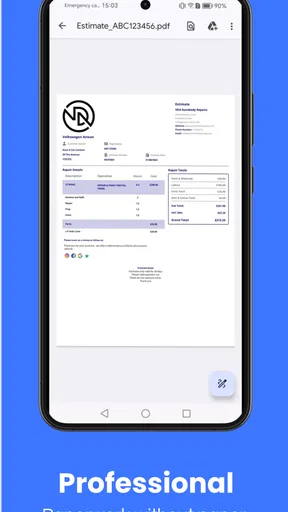
Another neat feature is the ability to generate professional-looking reports. These come in handy when you need to present your estimates to clients or stakeholders. The reports are detailed and customizable, which adds a nice touch of professionalism to your presentations.
Choosing it over familiar alternatives
For autobody work, the choice is not simply between this app and another estimator. A shop might use paper forms, a spreadsheet, or a broader business system. Paper can be quick for jotting down observations beside a vehicle, and spreadsheets are flexible when a business has an established calculation method. A dedicated app is more appealing when the same job needs to move from an estimate toward invoicing and other shop administration.
The trade-off is specialization. I would not choose this as my first option for estimating a bathroom renovation, tracking household spending, or comparing general contractor bids. Those tasks usually fit better in a spreadsheet or a home-project planner, because autobody repair has its own job details and customer workflow. The useful question is whether a shop needs a focused process, not whether an app can replace every form of estimating.
A practical first-day workflow
Imagine a customer calls while a technician is occupied. I would first capture the information that is actually known, then mark any uncertain details for follow-up rather than filling gaps with a guess. Once the vehicle or job can be assessed, I would prepare the estimate, review the itemized figures, and have the person responsible for customer communication check it before sending or discussing it. This keeps speed from taking priority over accuracy.
A small but useful habit is to separate the act of drafting from the act of approving. The person entering the details can focus on completeness; a second set of eyes can catch a misplaced figure or an assumption that needs confirmation. That matters especially when the phone is shared or the work is split between family members. It is a process tip rather than a feature claim, and it helps any estimating tool produce more dependable work.
Who benefits, and who should pass
I would consider it for an autobody shop owner or estimator who wants estimating, invoicing, and business tasks in one work-oriented app. It may also make sense for a small team where one person prepares job information and another handles customer-facing steps, provided they agree on who reviews the final figures. The app’s value is strongest when it becomes part of a repeatable shop routine rather than an occasional calculator.
I would skip it if I only needed a rough home repair budget, wanted a general-purpose family expense tracker, or preferred to keep all calculations in a spreadsheet I already understand. I would also be cautious if the shop cannot agree on who owns records and checks estimates. Installing a specialist app does not resolve unclear responsibilities; in that situation, a simple shared procedure may be more useful than adding another place to enter information.
What I would check before depending on it
Because the average rating is modest, I would make a deliberate trial part of the decision instead of assuming the app will match every shop’s habits. Start with a representative job, compare the entered details and resulting estimate against the shop’s normal method, and check how comfortable the people involved are with the workflow. If the output or handoff causes extra correction, that is a meaningful cost even if the app itself is easy to open.
It is also worth checking which in-app purchase, if any, corresponds to the work you expect to do before committing to a process around it. A free download is not the same as every capability being free. I would avoid purchasing first and working out the use case later; decide what the shop needs, test the basic routine, and then judge whether a paid option solves a real problem rather than simply adding another expense.
Final Thoughts
So, is the SMART Estimator App worth it? In my opinion, absolutely. It’s a solid investment for anyone in the construction or renovation industry. The app’s blend of usability, accuracy, and integration features makes it a must-have tool. Whether you’re managing a big project or just doing some home renovations, this app is bound to make your life a whole lot easier.
Give it a try and see for yourself. You might just find it’s the tool you didn’t know you needed. Happy estimating!
My household verdict
My honest recommendation is narrower than the enthusiastic pitch above: I would look at this for an autobody business, not for household renovations. The app is free to download, carries an Everyone age rating, and its current version is 4.3; it was released on January 6, 2021, and requires Android 9 or later. Those details help with basic fit, but the deciding factors are whether the shop’s work matches its purpose and whether the team can keep estimates and responsibilities organized.
For a shared household, I would install it only when someone genuinely needs an autobody estimating and business-management tool. Keep business use distinct, agree who checks figures, and evaluate any purchase against a concrete need. If your goal is simply to plan a family repair or renovation, a spreadsheet or general home-project tool is the more natural choice. That is the boundary I would use before making this app part of a shared device.
Pros
- Intuitive interface makes navigation easy.
- Fast estimates save time for busy professionals.
- Customizable templates enhance flexibility.
- Integration with other tools boosts productivity.
- Offline mode allows work without internet.
Cons
- Limited free features in the basic version.
- Occasional bugs in the app's performance.
- Requires frequent updates for optimal use.
- Advanced features may have a steep learning curve.
- Customer support response can be slow.
FAQs for SMART Estimator App
What is the SMART Estimator App used for?
The SMART Estimator App is designed to provide accurate and efficient estimates for various projects, including construction, renovation, and repair tasks. It helps users calculate costs and manage budgets by considering factors such as materials, labor, and time. This app is particularly useful for contractors, project managers, and DIY enthusiasts looking to streamline their planning processes.
Is the SMART Estimator App available for both Android and iOS devices?
Yes, the SMART Estimator App is available for download on both Android and iOS platforms. Users can find it on the Google Play Store and the Apple App Store, ensuring compatibility with a wide range of smartphones and tablets. This cross-platform availability makes it accessible to a broad audience.
Does the SMART Estimator App require an internet connection to function?
The SMART Estimator App can operate both online and offline. While an internet connection is needed for initial setup and updates, the app is designed to function efficiently offline, allowing users to manage and create estimates without constant connectivity. This feature is particularly beneficial for users working in remote locations.
What are the key features of the SMART Estimator App?
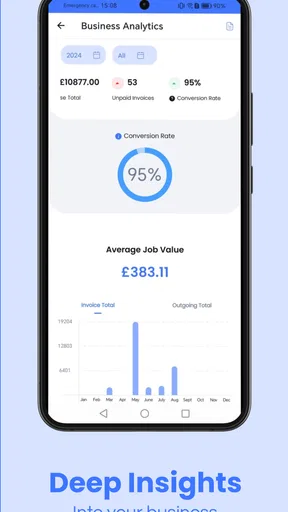
Key features of the SMART Estimator App include customizable templates, real-time cost calculation, a comprehensive materials library, and integration with other project management tools. The app also offers detailed reporting and analytics, enabling users to track expenses and make informed decisions. These features make it a versatile tool for managing various project types.
Is there a subscription fee for using the SMART Estimator App?
The SMART Estimator App offers a free version with basic functionalities, but for advanced features, a subscription is required. Several pricing tiers are available depending on the level of access and number of users. This allows individuals and businesses to choose a plan that best suits their needs and budget, providing flexibility in managing project costs.


